
Purview DLP for Microsoft 365 Copilot: what it enforces

An ArchiMate solution view of the Copilot DLP policy location: its four actions, which are in preview, and the limits that matter in a design review.
DLP for Copilot is the last-mile control. It stops Copilot from using certain content, but it only works on top of permissions that are already right. Most of the governance work sits elsewhere, see the capability map.
This view shows the one policy location for Microsoft 365 Copilot, Copilot Chat and Cowork, what it enforces, and where it stops. It’s a product view as of November 2026, and two of its four actions are in preview, so it will go out of date quickly.
The view
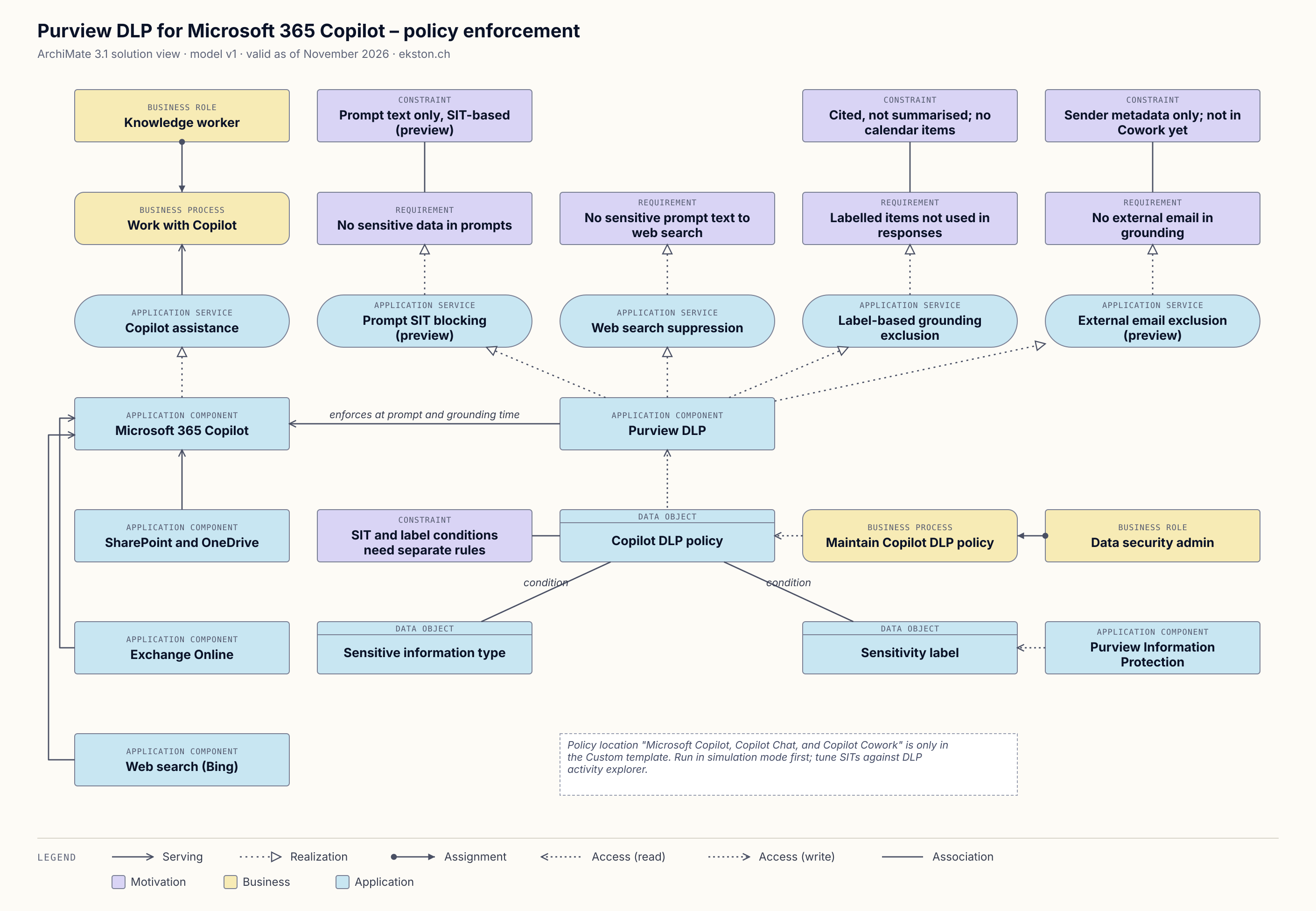
Purview DLP for Copilot, policy enforcement. The legend is in the image. Click to enlarge.
What it does
One policy location, four actions:1
| Condition | What Copilot does | State |
|---|---|---|
| Prompt contains a sensitive information type | Doesn’t respond, and doesn’t use the prompt for internal or web search | Preview |
| Prompt contains a sensitive information type | Answers from internal sources, but skips web search | GA |
| File or email carries a sensitivity label | Leaves it out of grounding | GA |
| Email comes from an external sender | Leaves it out of grounding | Preview |
Where it stops
- Labelled items can still show up as citations. Copilot just doesn’t use their content.
- Label exclusion covers emails sent from 1 January 2025 onwards. Calendar invites aren’t covered.
- Word, Excel and PowerPoint evaluate the label when the file opens. A label applied mid-session applies the next time someone opens the file.
- Sensitive information types and labels can’t share a rule. Put them in separate rules in the same policy.
- The external email check looks at the sender’s domain only, not the body. It isn’t available in Cowork.
- Files uploaded into a prompt aren’t scanned. Only the typed text is.
- Policy changes can take up to four hours to apply.
The last two aren’t in the model yet.
Rolling it out
The location only exists in the custom policy template, and selecting it disables all other locations in that policy. Run it in simulation mode first and tune the sensitive information types against the DLP activity explorer before you enforce anything.
Download the model
This view is part of the Copilot governance model. Download it from the capability map page.
Known weak spots
- Purview DLP serves Microsoft 365 Copilot through a single relationship, “enforces at prompt and grounding time”. The enforcement actually happens inside Copilot.
- Licensing isn’t modelled.
If you’d model something differently, I’d like to hear it.
Changelog
| Date | Change |
|---|---|
| 20 Nov 2026 | Version 1, first published. |
Microsoft Learn, DLP for Microsoft 365 Copilot, Copilot Chat, and Cowork, last updated 10 November 2026. All preview states and limits on this page are as of 20 November 2026. ↩︎