
Microsoft 365 Copilot governance: capability map

An ArchiMate solution view of what Copilot governance needs, in four capability groups, and which Microsoft product delivers each one. Includes the model as a download.
Copilot runs in the user’s security context. It creates no new access, it removes the friction that used to hide oversharing. So every control in this view narrows what permissions already allow, and none of it repairs broken permissions. That’s why oversharing control comes first.
The view groups what Copilot governance needs into four capability groups: oversharing control, information protection, Copilot and agent control, and AI oversight and compliance. Each capability is realised by a Microsoft product, mostly Purview, plus SharePoint Advanced Management, the Microsoft 365 admin center, Agent 365, the Power Platform admin center and Entra ID.
This is a product view of Microsoft’s capability set as of November 2026. It names products, is dated, and will go out of date. It doesn’t model licensing. One capability, DLP for Copilot, has its own enforcement view.
The view
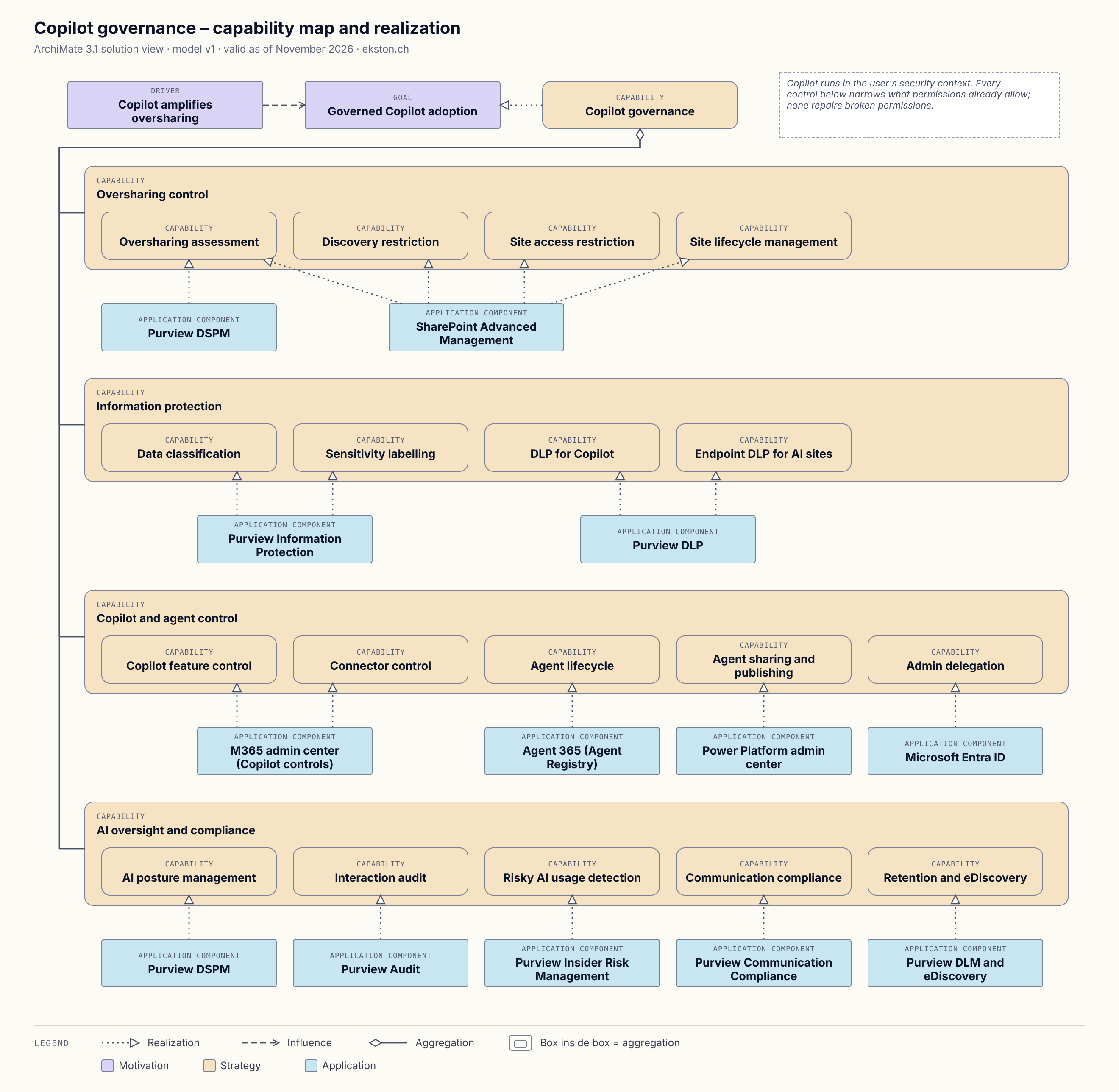
Capability map and realisation. The legend is in the image. Click to enlarge.
Download the model
Download the ArchiMate model (Open Exchange Format, version 1)
In Archi: File › Import › Open Exchange XML Model. The model has 61 elements, 68 relationships, and two views: this one and the DLP enforcement view.
Known weak spots
Same conventions as the BYOD views, same shortcuts:
- Application components realise capabilities and application services directly. Strictly, that’s a derived relationship that skips the functions in between.
- Purview DSPM appears in two capability groups. It’s one element with two references in the diagram, which is correct, but it reads like two products.
- Licensing isn’t modelled. Which control needs E5, the Copilot licence or SharePoint Advanced Management varies per feature, and I haven’t checked it.
If you’d model something differently, I’d like to hear it.
Dated claims
As of 20 November 2026, Restricted SharePoint Search can’t be newly enabled from 31 July 2026, and Restricted Content Discovery replaces it.1 The view’s documentation reflects that.
Changelog
| Date | Change |
|---|---|
| 20 Nov 2026 | Version 1, first published. |
Sources
- Microsoft Learn, Purview data security and compliance protections for generative AI apps
- Microsoft Learn, Copilot controls: security and governance
- Microsoft Learn, Copilot controls for management
- Microsoft Learn, SharePoint Advanced Management
- Microsoft Learn, Restricted Content Discovery
- Microsoft Learn, Manage agents in the Microsoft 365 admin center
Microsoft Learn, Restricted SharePoint Search. ↩︎