
Intune across platforms: what it really depends on

Five control patterns behind one Intune service: which vendor services each platform depends on, how access gets decided, and a Windows deep cut. Dated gap list included.
Microsoft’s platform tables show a tick for Windows, macOS, iOS, Android and Linux, so Intune looks like one product that behaves the same everywhere, but it reaches each platform in a different way, depends on different vendor services, and controls a different part of the device. Those differences shape your design, your support model, and what breaks when a certificate expires.
This page shows them in a set of diagrams. The first two cover all platforms and only change when the architecture changes. The rest go one level deeper for Windows. Feature gaps, which change with every monthly release, sit in a dated list near the end.
The short version
- Intune is one cloud service with five control patterns: Windows enrolled, Apple enrolled, Android Enterprise, Linux, and app protection without enrolment.
- Each pattern leans on a different vendor link. Apple’s push certificate and enrolment token need renewing every year. Android Enterprise runs through Google’s Managed Google Play. If one lapses, management of that platform stops while the others carry on.
- How far Intune’s control goes depends on the mode, not only the platform: the whole device, a separate work volume or profile, or just the data inside an app. Linux gets compliance checks and scripts, and access to Microsoft 365 web apps through Edge.
- Devices check in and pull their policy. Push services only wake them up so they check in sooner.
What endpoint management needs, before any product
The diagrams below are about Intune, but the yardstick behind them is a vendor-neutral list I keep of 28 things endpoint management and endpoint security have to do, whatever the product. This research run looked at some of them. Where the table says “not in this run”, read it as a gap in my research, not as a missing Intune feature. The full list is on its own page: Endpoint management and security model.
| Group | Capabilities | On this page |
|---|---|---|
| Enrol and recover | Corporate enrolment, personal enrolment, recovery and rebuild, coexistence and migration | Enrolment, yes. Reset and wipe in part. Migration isn’t in this run |
| Configure | Configuration baseline, certificates and network profiles, scripted checks and remediation, device identity and sign-in | Yes |
| Apps and data | App delivery, packaging and catalogue, app-level data controls, third-party app updates | Delivery, yes. App-level data controls appear as their own control pattern. Packaging and third-party updates aren’t in this run |
| Update and operate | OS updates, inventory, remote assistance, shared devices, retirement, admin plane | Updates, inventory and retirement, yes. Shared devices only as Android dedicated mode. Remote assistance and the admin plane aren’t in this run |
| Posture and governance | Posture evaluation, exceptions and waivers | Compliance, yes. Exceptions aren’t in this run |
| Reduce exposure | Vulnerability assessment, hardening, disk encryption, peripheral control, local admin and elevation, application control, exploit protection | Disk encryption and local admin passwords, yes. The rest aren’t in this run |
| Detect and respond | Antimalware, detection and response | Only as Defender’s risk level feeding compliance |
The access decision is missing from the list on purpose. Whether a device may reach a resource is decided by the identity provider, in Intune’s case Conditional Access in Entra ID. Intune only supplies the verdict. That’s why the access flows further down show Conditional Access as the decision point, not Intune.
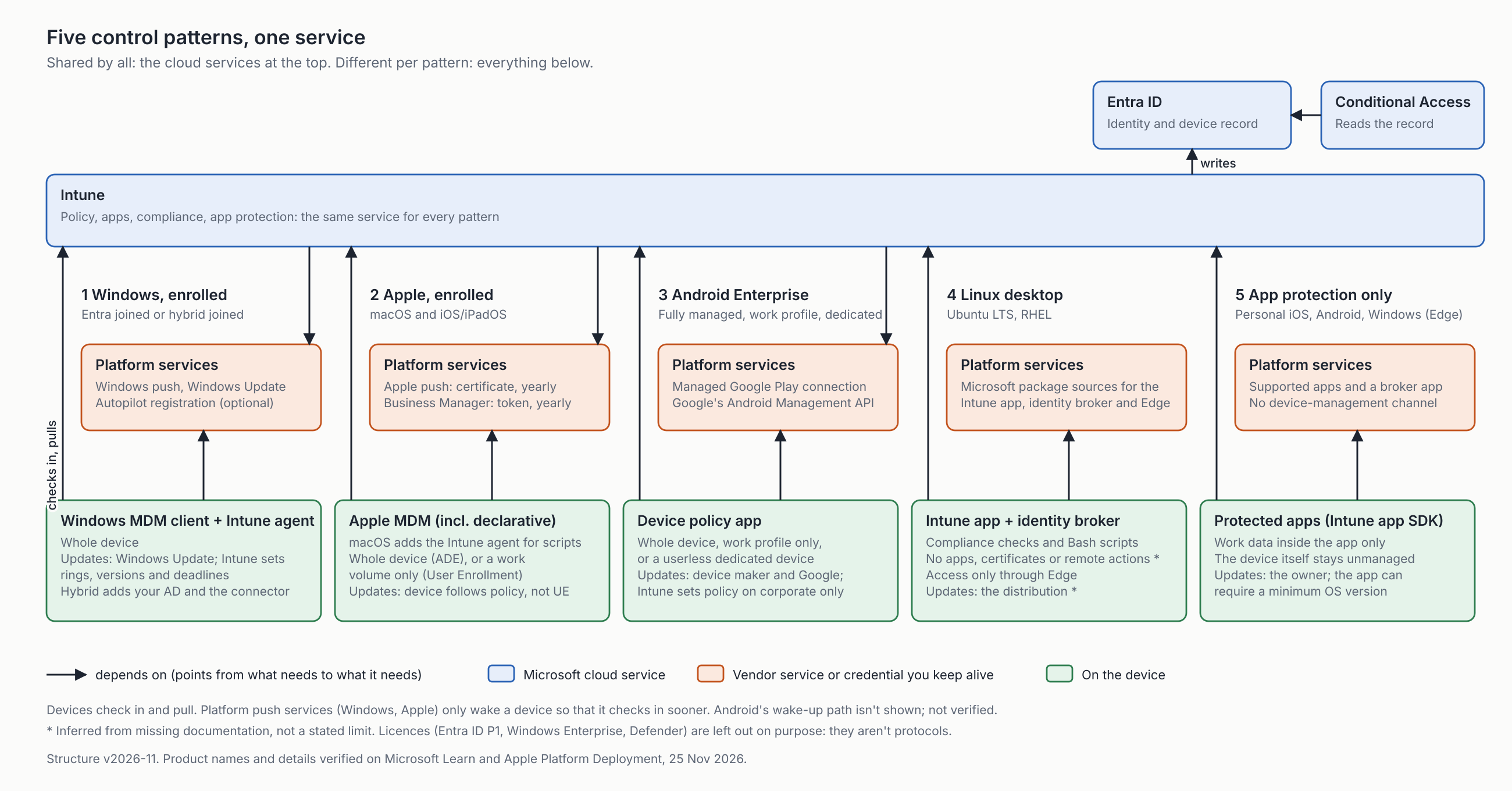
Five control patterns, one service
Click to enlarge.
Read it from the bottom up. Each lane shows what sits on the device, which platform services it relies on, and how it reaches Intune. Arrows point from what needs something to what it needs.
Windows and Apple look alike from a distance. Both have a management client built into the OS, a push service that wakes the device, and on Windows and macOS an Intune agent for the jobs the built-in client can’t do. On Windows that’s apps and scripts; on macOS it’s scripts and some app types. iOS has no such agent.
Android is the odd one in the enrolled group. Intune talks to Google’s management API, and a device policy app on the phone applies the settings. The Managed Google Play connection, your organisation’s link to Google, is part of the chain.
Linux is app-led. The Intune app and an identity broker register the device and report compliance. I couldn’t find app delivery, certificate profiles or remote actions for Linux in Microsoft’s documentation.
App protection works without enrolling the device. The policy lives inside the app, so the device itself stays outside the boundary. That’s the realistic option for personal phones and, through Edge, for personal Windows PCs.
Hybrid join adds your Active Directory and the Intune Connector for Active Directory to the Windows lane. It’s the main on-premises dependency in enrolment.
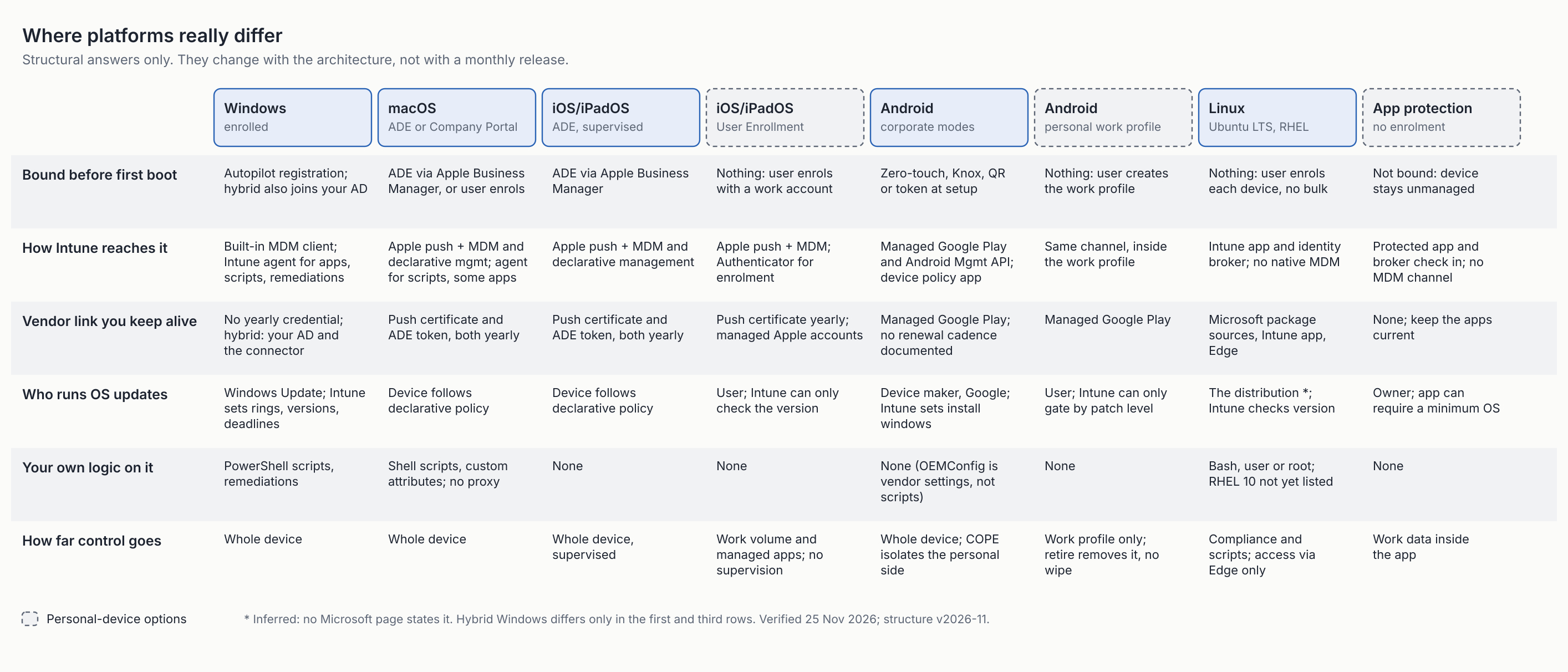
Where platforms really differ
Click to enlarge.
The matrix answers six questions for eight platforms and modes. I kept only questions whose answers change with the architecture, not with a release. Dashed column headers are options for personal devices.
Only Apple asks you to renew credentials every year. Windows has no yearly credential, and Android’s Google connection has no documented renewal cycle. Only corporate modes let Intune steer OS updates; on personal devices it can check the version and block access, nothing more.
Apple’s renewal has two traps. The push certificate has to be renewed with the same Apple account that created it, so that account needs an owner who outlasts the person who set it up. And downloading the enrolment token again in Apple Business Manager invalidates the one Intune is using.
The depth of control also splits inside a platform. An iPhone set up through automated enrolment is supervised and fully managed. One enrolled with User Enrollment only has a managed work volume, and Apple’s update enforcement doesn’t reach it. A planning sheet with one column per OS hides exactly that.
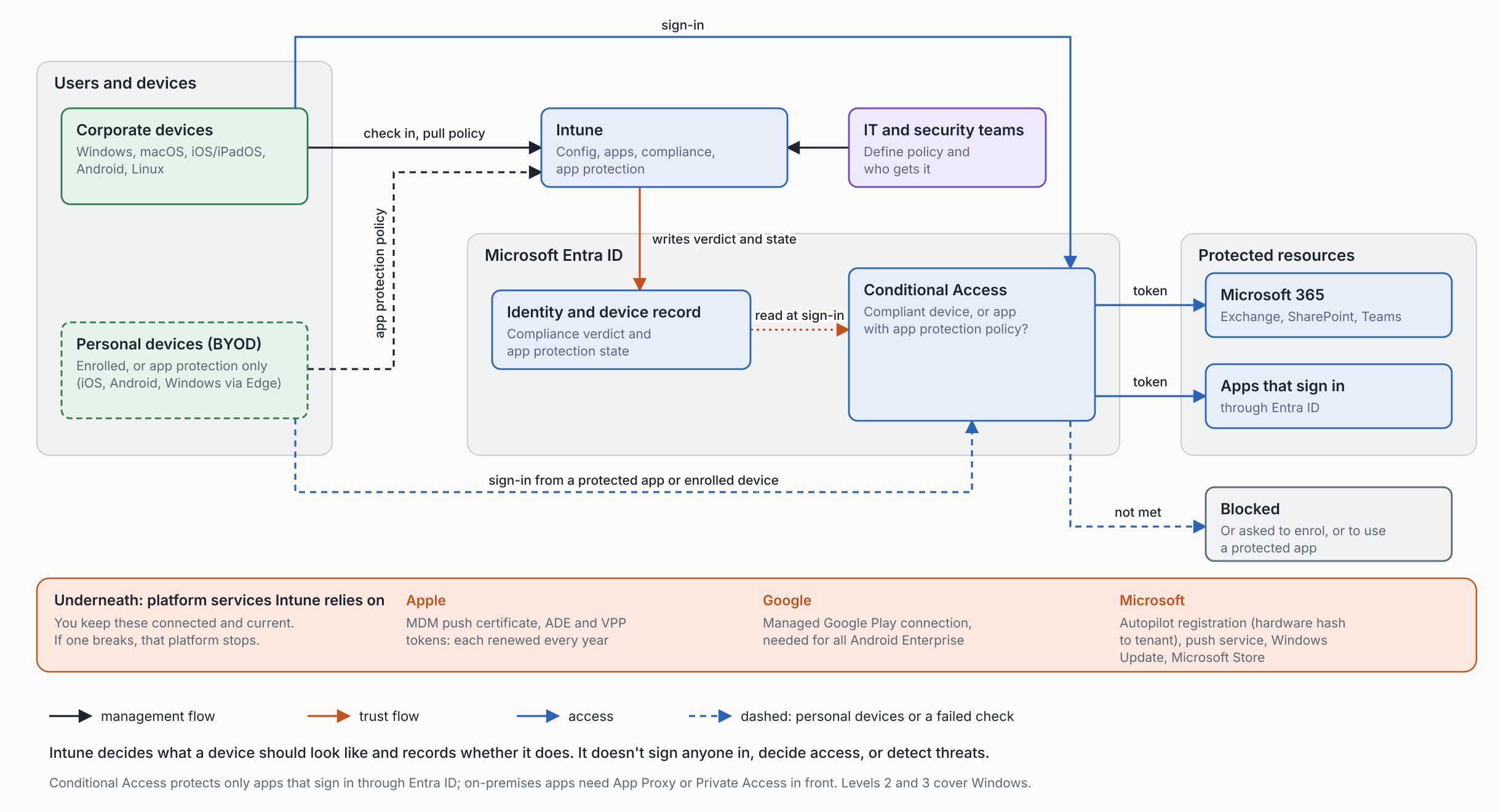
How access gets decided
Click to enlarge.
This view follows a sign-in rather than a dependency, so its arrows show what talks to what.
Intune decides what a device should look like and records whether it does. It writes that verdict to the device record in Entra ID. Conditional Access reads it there when it issues a token, and that’s where access is allowed or blocked. Intune itself doesn’t sign anyone in, decide access, or detect threats.
Conditional Access only protects apps that sign in through Entra ID, so on-premises apps need App Proxy or Private Access in front. A changed verdict also only counts at the next token, not for sessions that are already open.
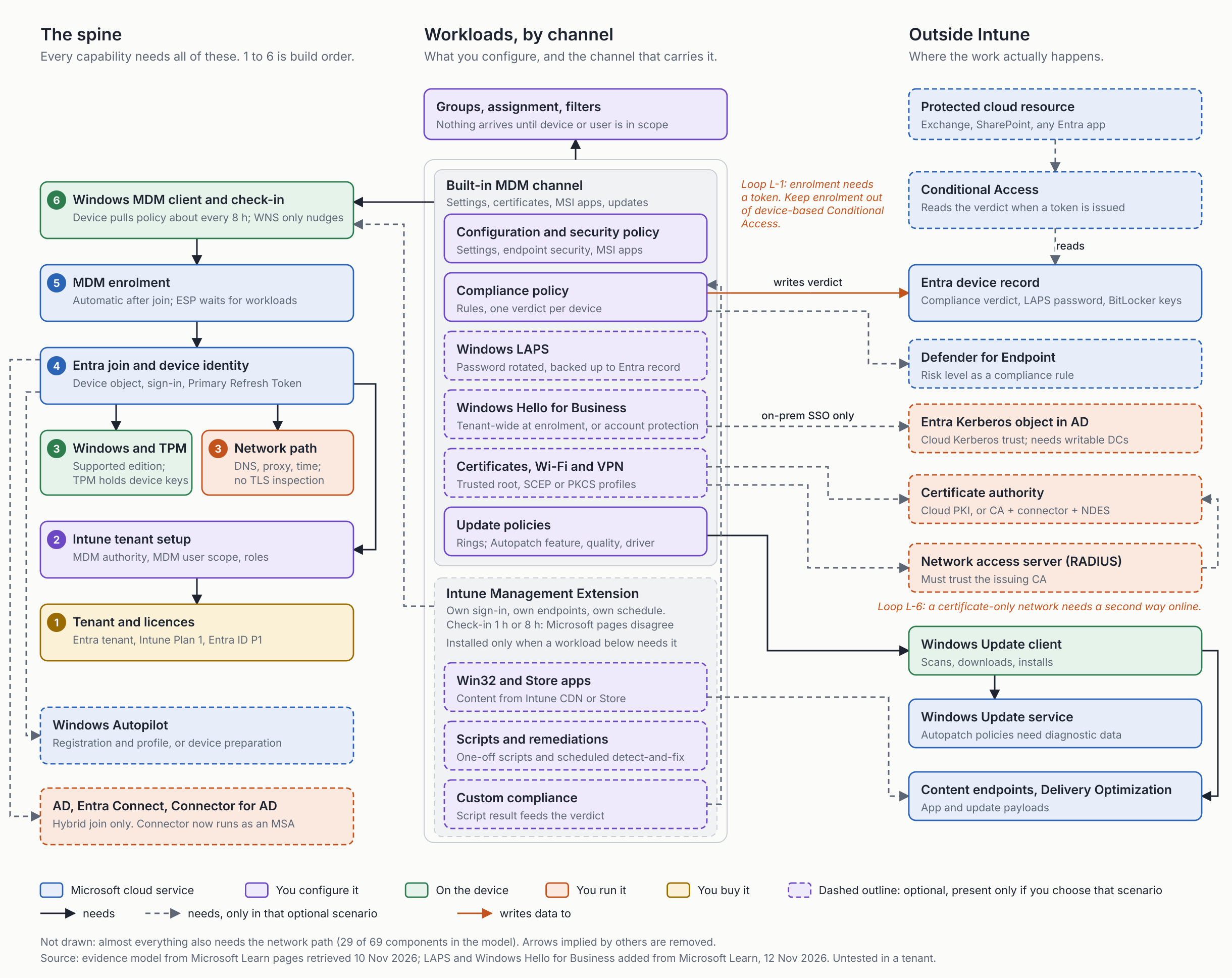
Windows deep cut: what depends on what
Click to enlarge.
For Windows I went one level deeper, starting from an evidence model of 69 components taken from Microsoft Learn. The map reduces them to 26 boxes and only draws an arrow where no other path already implies it.
The left column is the spine: tenant and licences, Intune setup, Windows and the network path, Entra join, enrolment, and the MDM client that checks in. Every capability needs all of it, built in that order. If one box breaks, nothing to its right works.
The middle column splits the workloads by channel. Settings, compliance, certificates and update policies travel through the MDM client built into Windows. Win32 apps, scripts and custom compliance need the Intune Management Extension, which has its own sign-in, its own endpoints and its own schedule. Microsoft’s pages don’t agree on how often it checks in: every hour or every eight hours.
Watch for chicken-and-egg loops. Enrolment needs a token, so device-based Conditional Access has to leave enrolment out. And a network that only accepts devices with a certificate needs a second way online for devices that don’t have one yet.
Windows deep cut: which capability needs what
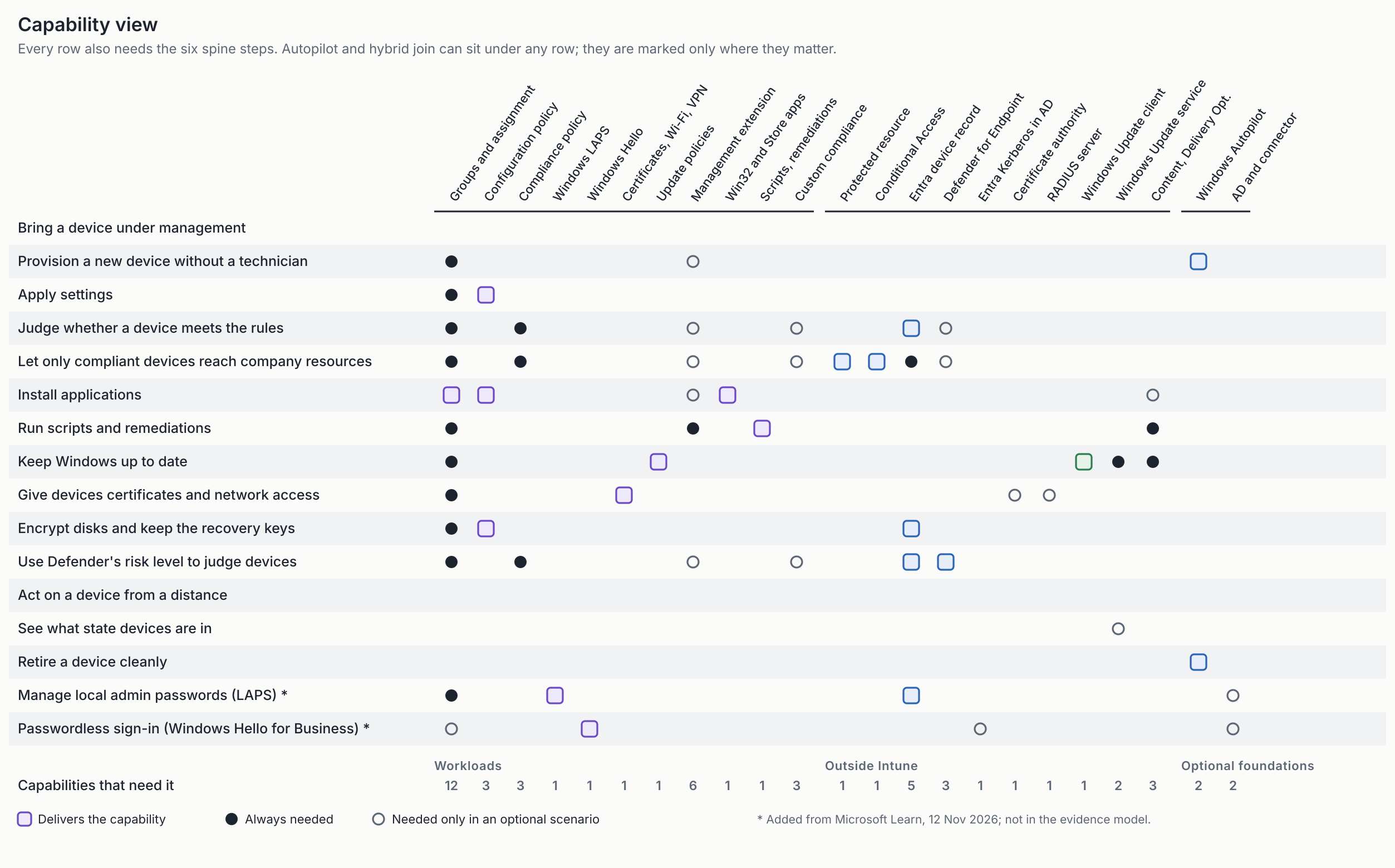
Click to enlarge.
The matrix maps 16 things you’d want Intune to do onto the boxes of the Windows map, in lifecycle order from enrol to retire. A square marks the box that delivers the capability. A filled dot means it’s always needed, a hollow dot that it’s needed only in some scenarios. The last column names licences beyond Intune Plan 1 and Entra ID P1.
Groups and assignment are needed by 12 of the 16 capabilities, so a messy group design hurts almost everything. The management extension, often treated as optional, is needed by 6 of 16. The rows for LAPS and Windows Hello for Business are my own additions from Microsoft Learn and carry an asterisk.
Current gaps, verified 25 November 2026
These change with releases, so they stay out of the drawings. Check the link before you quote one.
- macOS compliance has no Defender risk rule; Windows, iOS and Android have one. (source)
- macOS compliance isn’t evaluated for userless Macs. (source)
- A password rule in macOS compliance expires the passwords of LAPS and Platform SSO accounts. Microsoft recommends the settings catalog instead. (source)
- macOS LAPS only covers Macs set up through automated enrolment after a factory reset. (source)
- macOS shell scripts need a direct internet connection; proxies aren’t supported. (source)
- Admins see FileVault recovery keys only for Macs marked as corporate. Rotation works for any managed Mac. (source)
- Microsoft’s pages disagree on whether macOS supports custom compliance scripts: the custom compliance page lists it, the compliance policy page doesn’t.
- iOS User Enrollment has no supervision, and Apple’s update enforcement doesn’t apply to it. (source)
- iOS User Enrollment only supports per-app VPN, no Safari domains, and four remote actions: retire, delete, lock and sync. (source)
- Android personal work profiles can’t be wiped; retire removes the work profile. There’s no update policy, only access gating. (source)
- Android dedicated devices without Entra shared device mode can’t sign users in to resources behind Conditional Access. (source)
- Windows app protection is generally available for Edge only; Windows App is in preview. (source)
- Windows hybrid join: Autopilot device preparation supports Entra join only, and Autopilot Reset only works on Entra-joined devices. (source)
- Linux: no app type, certificate profile, remote action or update policy found (inferred from missing documentation). No bulk enrolment. Microsoft’s pages disagree on personal devices, and the Bash script page doesn’t list RHEL 10 yet. (source)
- Linux identity broker 2.0.2 and later re-enrols devices with new device IDs, which breaks assignments built on device IDs. (source)
Licences are kept out of the drawings on purpose: Entra ID P1 for Conditional Access, Windows Enterprise E3 or E5 for remediations, Windows Enterprise or Microsoft 365 Business Premium for Autopatch, Defender for Endpoint for the risk rule, and Intune Plan 2 or an add-on for Samsung firmware control.
How this page stays current
The drawings follow one rule: a box only names something that will still be true after the next monthly release. Feature support, version numbers and portal names go into the gap list instead, with a date and a link. The structure stamp in each drawing (v2026-11) only moves when the architecture changes.
The gap list shows when I last checked it. When a Microsoft Learn page changes the picture, I update the entry and the date.
The page leaves out co-management with Configuration Manager, Android device administrator and AOSP, ChromeOS, government clouds, and licensing beyond the few points that decide an architecture.
Method and sources
The model draws on Microsoft Learn and Apple’s Platform Deployment guide, retrieved between 10 and 25 November 2026. AI research tools gathered the sources and drafted the first model. I checked the structural claims the diagrams rest on against Microsoft Learn myself. Where Microsoft’s own pages disagree, this page says so instead of picking a side. An asterisk marks either my own addition or something inferred from missing documentation, not a limit Microsoft states.
Key pages:
- Windows Autopilot registration overview
- Get an Apple MDM push certificate
- Connect Intune to Managed Google Play
- Deployment guide: manage Linux devices
- App protection settings for Windows
- Configure update policies for Apple devices
- User Enrollment for iOS and iPadOS
- Device actions by platform
- Configure Defender for Endpoint with Intune
- Cloud Kerberos trust deployment guide
- Configure devices to work with APNs (Apple)