
Microsoft 365 Backup cost estimator

An estimate of the Microsoft 365 Backup bill for Exchange Online, OneDrive and SharePoint, including the deleted and changed data that stays billed for the recovery window.
Microsoft 365 Backup is billed per GiB of protected data per month. That sounds easy to estimate: add up mailbox, OneDrive and site sizes and multiply. It isn’t, because the bill also counts deleted and changed content held for recovery, and that part grows with the recovery window you pick. The estimator models both, so you can see what the first bill looks like and what the third year looks like.
It covers Exchange Online, OneDrive and SharePoint at Microsoft’s list price, plus Entra ID backup if you want it. It leaves out partner products built on Microsoft 365 Backup Storage, discounts, tax, and any comparison with other backup products. This is a product view: it names one product, is dated, and will go out of date.
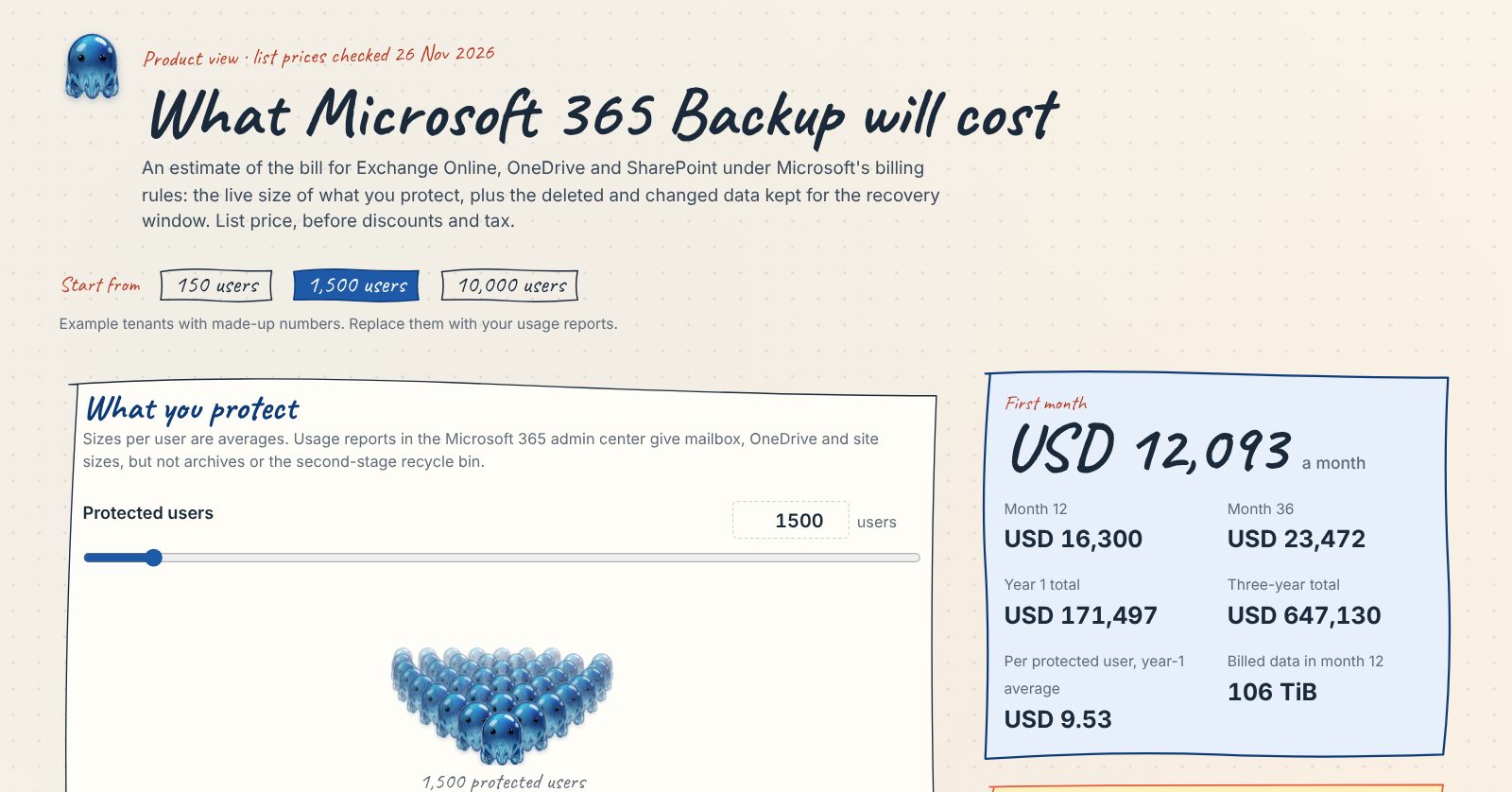
Open the estimator → The link in your address bar keeps your inputs, so you can send it on.
How the bill works
The list price is USD 0.15 per GiB per month.1 Microsoft counts two things:1
- The live size of everything in a backup policy, including the first-stage recycle bin and online archives.
- Deleted and versioned content held for recovery: the second-stage recycle bin, and deleted or changed mailbox items.
The second part stays on the bill until the recovery window lapses. Delete half a site today and you pay for the full site until the deleted half expires from the backup. Items you take out of a policy keep billing at their size on removal, for the same reason.
The recovery window used to be a fixed year. It’s now 3 months, 6 months or 1 to 10 years for SharePoint and OneDrive, and up to 2 years for Exchange.2 A longer window costs nothing on day one. It costs a lot in year five.
Restore point frequency doesn’t change the price, restores are free, and there’s no separate Azure storage charge.1
The model
For each workload, the billed size in month m is:
live size(m) + churn × the sum of live sizes over the months still inside the recovery window
Live size grows smoothly at the yearly rate you enter. Churn is the share of live data deleted or overwritten each month.
A few assumptions sit underneath, and they’re the place to argue with the numbers:
- Churn is a guess unless you measure it. Microsoft’s own rule of thumb is that the second-stage recycle bin holds about three months of churn.1 Divide its size by three and by live size to get a monthly rate. The examples use 1.5 to 2%, which is a placeholder, not a benchmark.
- SharePoint and OneDrive start with three months of churn already on the bill, because the second-stage recycle bin is counted from the first day. Mailboxes start at zero.
- Online archives are treated as churn-free. They mostly grow, and rarely change.
- One churn rate for everything. Real tenants have quiet archive sites and noisy project sites. If you know the split, run them separately.
- Shared mailboxes count; room and group mailboxes don’t, because the service doesn’t back them up.3
Microsoft publishes its own Excel calculator.1 It assumes no growth and no churn for its 12-month figure, so it gives you the floor. This estimator is closer to the ceiling, depending on what churn you enter.
Before you put the number in a business case
The first real bill tells you more than any estimate. Turn the service on for one policy, wait a month, and read the meter in the Azure cost report.
A few things the estimate can’t show:
- Granular file restore only reaches back 14 days. Older restore points roll back a whole site or OneDrive account.3 A ten-year window won’t give you a single file from three years ago.
- The backup isn’t a separate copy. It stays inside the Microsoft 365 service boundary, in your tenant.4 Offboarding deletes it after a 90-day grace period, and offboarding starts on its own if the Azure billing account becomes unhealthy.5 Whether you also need a copy outside the tenant is a separate decision with its own cost.
- Entra ID is optional and priced differently. Entra Backup and Recovery Premium is switched on through Microsoft 365 Backup, but billed at USD 0.025 per protected object per month, with a fixed 30-day window, and currently in preview.12 Entra ID P1 or P2 already includes a Standard plan with seven days.2 The estimator adds Premium only if you enter an object count.
- CHF amounts use the exchange rate you enter. Azure bills in your billing currency from Microsoft’s own price list, so expect a small difference.
Changelog
| Version | Date | Change |
|---|---|---|
| 1 | 26 Nov 2026 | First version. Billing rules, recovery windows and coverage checked against Microsoft Learn on 26 Nov 2026. |
Microsoft Learn, Pricing model for Microsoft 365 Backup, checked 26 November 2026. ↩︎ ↩︎ ↩︎ ↩︎ ↩︎ ↩︎
Microsoft Learn, Create, view, and edit backup policies in Microsoft 365 Backup, section “Configure the backup recovery window”, checked 26 November 2026. ↩︎ ↩︎ ↩︎
Microsoft Learn, Frequently asked questions about Microsoft 365 Backup, checked 26 November 2026. ↩︎ ↩︎
Microsoft Learn, Overview of Microsoft 365 Backup, section “Architectural overview”, checked 26 November 2026. ↩︎
Microsoft Learn, Offboarding in Microsoft 365 Backup, checked 26 November 2026. ↩︎