
Third-party patching: who holds the connector credential

An ArchiMate solution view of the trust chain behind third-party patching in Intune: a vendor-held and a customer-held connector, the same permission, and which controls reach each. Includes the model as a download.
A patching tool that publishes Win32 apps to Intune can run code as SYSTEM on every managed device. That makes its connector a tier-0 asset. This view shows the two ways the connector can reach your tenant, and which of your controls reach each one.
Both paths end at the same Graph permission, DeviceManagementApps.ReadWrite.All, so they look identical on a permission list. The difference is who holds the credential. A vendor’s multi-tenant app keeps it in the vendor’s cloud. A self-hosted publisher with your own app registration keeps it on a server you run. Only the second can be fenced with Conditional Access for workload identities.1
The reasoning behind the view is in Who Holds the Keys to Your Patching?. This is a product view. It names products, is dated, and will go out of date. It covers Windows endpoints managed by Intune. It leaves out packaging itself, macOS, ConfigMgr, WinGet and Chocolatey. Microsoft’s Enterprise App Catalog is a third path with no third-party credential, and it’s not in the view either.
The view
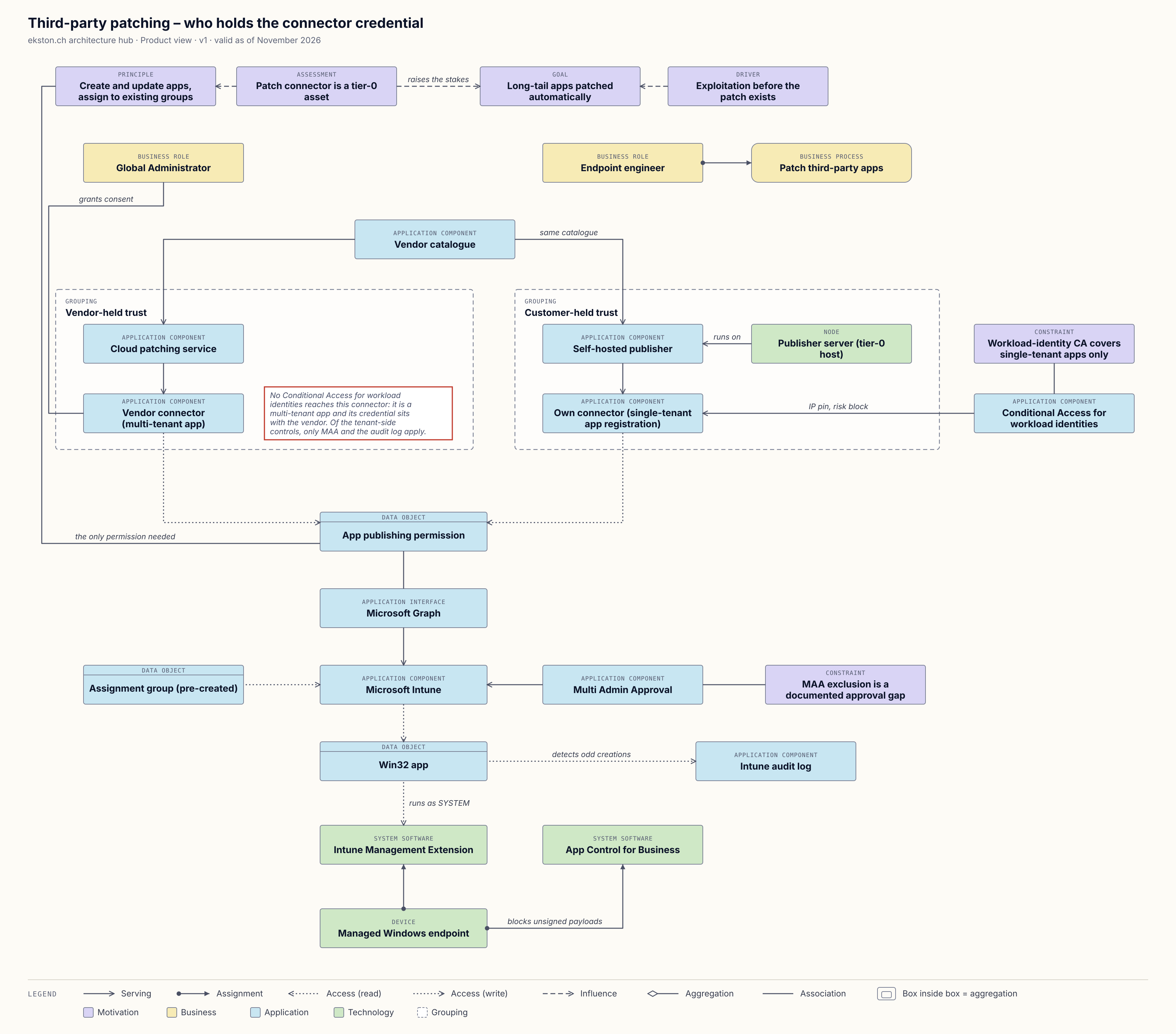
Who holds the connector credential. The legend is in the image. Click to enlarge.
Two things in the view are worth a second look:
- No Conditional Access edge reaches the vendor connector. Microsoft states that third-party SaaS and multi-tenant apps aren’t covered by these policies. I’ve drawn that absence as a note, because a missing line is easy to miss.
- Multi Admin Approval now covers app-only Graph calls, so it could gate the connector. In practice vendors recommend excluding their app.2 An exclusion only applies to that one service principal’s app-only calls, and adding it needs a second admin’s approval. That’s why the audit log sits next to it in the view.
The SYSTEM label assumes the app’s install context is System, which is what patching tools use for machine-wide installs. Apps set to user context run as the user.
Download the model
Download the ArchiMate model (Open Exchange Format, version 1)
In Archi: File › Import › Open Exchange XML Model. The model has 28 elements (two of them groupings), 30 relationships, and one view.
Known weak spots
- The permission is modelled as a data object that both connectors write to. Strictly, it’s a grant on a service principal, not data. I drew it this way so the two paths visibly meet in one place.
- The “no Conditional Access” note is a deliberate absence, not an ArchiMate element. Purists will call it a cheat, and they have a point.
- Application components access the permission and the Win32 app directly, without functions in between. Same shortcut as the BYOD views.
- Licensing is only noted, not modelled: Conditional Access for workload identities needs a Workload Identities Premium licence to create or change policies.1
- The view stays generic. Patch My PC and Robopack appear only as examples in the element documentation.
If you’d model something differently, I’d like to hear it.
Changelog
| Date | Change |
|---|---|
| 21 Nov 2026 | Version 1, first published. |
Microsoft Learn, Conditional Access for workload identities, checked 20 November 2026. ↩︎ ↩︎
Microsoft Learn, Multi Admin Approval for Graph API calls, last updated 6 August 2026. The vendor recommendations are quoted and linked in the post. ↩︎